Posts

glTF loader for Android Vulkan
Image
This post is going to introduce how we integrate with an existing glTF loader library to make it be able to show glTF models in our Vulkan rendering framework,  vulkan-android . tinygltf In the beginning, we don't want to make our new own wheel, so choosing  tinygltf as our glTF loader. tinygltf is a C++11 based library that would help us support all possible cross-platform project easily. tinygltf setup in Android Studio In  vulkan-android  project, we put third party libraries into third_party folder. Therefore, we need to include tinygltf from third_party folder in app/CMakeLists.txt as below. set(THIRD_PARTY_DIR ../../third_party) include_directories(${THIRD_PARTY_DIR}/tinygltf) Model loading from tinygltf We are going to load a gltf ASCII or binary format model from the storage. tinygltf provides two APIs , they are LoadBinaryFromFile() and LoadASCIIFromFile() respectively based on the extension name is *.glb or *.gltf. TinyGLTF loader will return a tiny...

Drawing textured cube with Vulkan on Android

Image
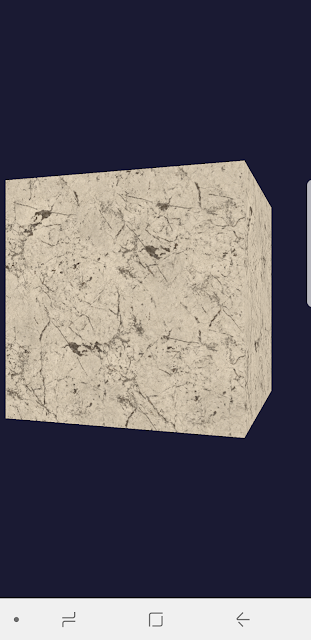
Vulkan is a modern hardware-accelerated Graphics API. Its goal is providing an high efficient way in low-level graphics and compute on modern GPUs for PC, mobile, and embedded devices. I am personally working a self training project, vulkan-android , to teach myself how to use this new APIs. The difference between OpenGL and Vulkan OpenGL: Higher level API in comparison with Vulkan, and the next generation of OpenGL 4 will be Vulkan.   Cross-platform and Cross-language (mostly still based on C/C++, but people implemented diverse versions and expose similar API binding based on OpenGL C++, WebGL is a good example).  Mainly used in 3D graphics and 2D image processing to interact with GPU in order to achieve hardware acceleration. Don't have a command buffer can be manipulated at the application side. That means we will be easily see draw calls being the performance bottleneck in a big and complex 3D scene. Vulkan: Cross-platform and low-overhead. Erase the boundary bet...

C++ unit testing & CI integration in GitHub (2/2)

Image
Based on the previous post , we are able to integrate our Android JNI project with CI tools, Circle-CI and GitHub Actions. However, we still have a little unperfected because we were unable to enable an Android emulator running for Android JNI unit tests. Now, I think I got a solution, it is using Android Emulator Runner . Add a job for Android Emulator When I first saw the instruction from  Android Emulator Runner , I was thinking it should be super easy and should not take me an hour, but I was wrong... Let's use the sample config from that Android Emulator Runner link. jobs: test: runs-on: macos-latest steps: - name: checkout uses: actions/checkout@v2 - name: run tests uses: reactivecircus/android-emulator-runner@v2 with: api-level: 29 script: ./gradlew connectedCheck This test job is run on a Mac OS machine and going to checkout your code from the repo and launch an Android emulators. I am supposed Linux and Windows machine a...

C++ unit testing & CI integration in GitHub (I/2)

Image
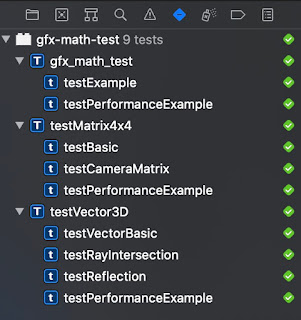
I am working on a side project,  Vulkan-Android , that is based on Java, JNI, C++, and Vulkan for Android platform. It also uses my C++ math library. Therefore, the requirement of my build and unit tests are around C++. First of all, I would make sure the unit tests in local are run properly. C++ unit test on Mac OS On Mac OS, I think the most convenient way to do unit testing for C++ is writing XCT in Xcode. In the beginning, we need to create a test plan in Xcode. It will helps us create a schema, then, in the test navigator, create a new Unit Test Target. Due to XCT was originally designed for Objective-C or Swift, if we wanna test our C++ code, we need a workaround by making the file extension name to be *.mm . And then, write down the unit tests as below: #import <XCTest/XCTest.h> #include "Vector3d.h" using namespace gfx_math; @interface testVector3D : XCTestCase @end @implementation testVector3D - (void)setUp { // Put setup code here. This method is cal...

Experimental integration Glean with Unity applications

Image
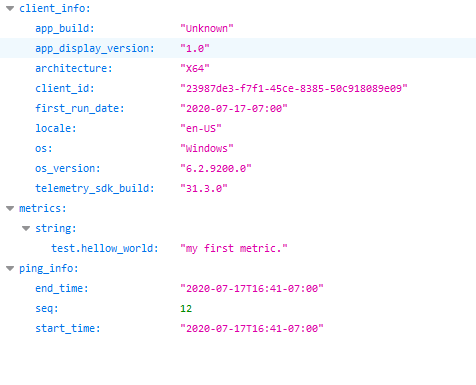
You might notice  Firefox Reality PC Preview  has been released in HTC’s Viveport store. That is a VR web browser that provides 2D overlay browsing alongside immersive content and supports web-based immersive experiences for PC-connected VR headsets. In order to easily deploy our product into the Viveport store, we take advantage of Unity to help make our application launcher. Also because of that, it brings us another challenge about how to use Mozilla’s existing telemetry system. As we know,  Glean SDK  has provided language bindings for different programming language requirements that include Kotlin, Swift, and Python. However, when we are talking about supporting applications that use Unity as their development toolkit, there are no existing bindings available to help us achieve it. Unity allows users using a Python interpreter to embed Python scripts in a Unity project; however, due to Unity’s technology being based on the Mono framework, that is not the same as...

How to train custom objects in YOLOv2

Image
This article is based on [1]. We wanna a way to train the object tags that we are interested. Darknet has a Windows version that is ported by AlexeyAB [2]. First of all, we need to build darknet.exe from AlexeyAB to help us train and test data. Go to build/darknet, using VS 2015 to open darknet.sln, and config it to x64 solution platform. Rebuild solution! It should be success to generate darknet.exe. Then, we need to label objects from images that are used for training data. I use BBox label tool to help me label objects' coordinates in images for training data. (python ./main.py) This tool's image root folder is at ./Images, we can create a sub-folder ( 002 ) and insert 002 to let this tool load all *.jpg files from there. We will mark labels in this tool to help us generate objects' region to mark where objects are. The outputs are the image-space coordinate in images and stored at ./Labels/002 . However, the format of this coordinate is different from YOLOv2, YOLOv2...

Fast subsurface scattering

Image
Fig.1 - Fast Subsurface scattering of Stanford Bunny Based on the implementation of three.js . It provides a cheap, fast, and convincing approach to do ray-tracing in translucent surfaces. It refers the sharing in GDC 2011  [1], and the approach is used by Frostbite 2 and Unity engines [1][2][3]. Traditionally, when a ray intersects with surfaces, it needs to calculate the bouncing result after intersections. Materials can be divided into three types roughly.  Opaque , lights can't go through its geometry and the ray will be bounced back.  Transparency , the ray passes and allow it through the surface totally, it probably would loose a little energy after leaving.  Translucency , the ray after entering the surface will be bounced internally like below Fig. 2. Fig.2 - BSSRDF [1] In the case of translucency, we have several subsurface scattering approaches to solve our problem. When a light is traveling inside the shape, that needs to consider the ...

Physically-Based Rendering in WebGL

Image
According to the image from  Physically Based Shading At Disney  as below, the left is the real chrome, the middle is PBR approach, and the right is Blinn-Phong. We can find PBR is more closer to the real case, and the difference part is the specular lighting part. Blinn-Phong The most important part of specular term in Blinn-Phong is it uses half-vector instead of using dot(lightDir, normalDir) to avoid the traditional Phong lighting model hard shape problem. vec3 BRDF_Specular_BlinnPhong( vec3 lightDir, vec3 viewDir, vec3 normal, vec3 specularColor, float shininess ) { vec3 halfDir = normalize( lightDir + viewDir ); float dotNH = saturate( dot( normal, halfDir ) ); float dotLH = saturate( dot( lightDir, halfDir ) ); vec3 F = F_Schlick( specularColor, dotLH ); float G = G_BlinnPhong_Implicit( ); float D = D_BlinnPhong( shininess, dotNH ); return F * ( G * D ); } Physically-Based rendering Regarding to the lighting model of GGX, UE4 Shading present...

Setup TensorFlow with GPU support on Windows

TensorFlow with GPU support brings higher speed for computation than CPU-only. But, you need some additional settings especially for CUDA. First of all, we need to follow the guideline from https://www.tensorflow.org/install/install_windows . TensorFlow on Windows currently only has Python 3 support, I suggest to use python 3.5.3 or below. Then, install CUDA 8.0 and download cuDNN v6.0. Then, move the files from cuDNN v6.0 that you already download to the path where you installed CUDA 8.0, like "C:\Program Files\NVIDIA GPU Computing Toolkit\CUDA\v8.0", following the steps as below: cudnn-8.0-windows10-x64-v6.0\cuda\bin\cudnn64_6.dll ---------------- CUDA\v8.0\bin cudnn-8.0-windows10-x64-v6.0\cuda\include\cudnn.h ---------------------- CUDA\v8.0\include cudnn-8.0-windows10-x64-v6.0\cuda\lib\x64\cudnn.lib --------------------- CUDA\v8.0\lib\x64 Don't need to add the folder path of cudnn-8.0-windows10-x64-v6.0 to your %PATH%. Now, we can start to confirm our install...

Webrender 1.0

Webrender 1.0 from Daosheng Mu Source code: https://github.com/servo/webrender

AR on the Web

Image
Because of the presence of PokĂ©mon Go, lots of people start to discuss the possibility of AR (augmented reality) on the Web. Thanks for Jerome Etienne's slides , it brings me some idea to make this AR demo. First of all, it is based on  three.js and js-aruco . three.js is a WebGL framework that helps us construct and load 3D models. js-aruco is Javascript version of ArUco that is a minimal library for Augmented Reality applications based on OpenCV. These two project make it is possible to implement a Web AR proof of concept. Then, I would like to introduce how to implement this demo. First, we need to use  navigator .getUserMedia to give us the video stream from our webcam. This function is not supported on all browser vendors. Please take a look at the status. http://caniuse.com/#feat=stream navigator.getUserMedia = ( navigator.getUserMedia || navigator.webkitGetUserMedia || navigator.mozGetUserMedia || ...

How to setup RustDT

Image
RustDT is the IDE for Rust. If you are a guy like me who need a IDE for learning language and developing efficiently, you must have a try on RustDT( https://github.com/RustDT/RustDT/blob/latest/documentation/UserGuide.md#user-guide ) Enable code complete. Here you go!

WebGL/VR on Worker thread

Image
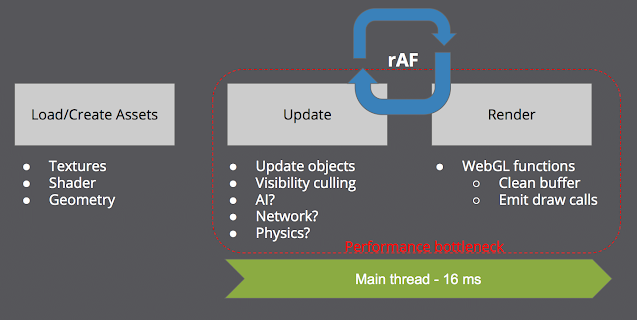
WebGL on main thread As before. Developing a WebGL application, the only approach is put all the stuff at the main thread. But it would definitely bring some limitations for the performance. As the above picture shows, in a 3D game, it might need to do lots of stuff in a update frame. For example, updating the transformation of 3D objects, visibility culling, AI, network, and physics, etc. Then, we finally can hand over it to the render process for executing WebGL functions. If we expect it could done all things in the V-Sync time (16 ms), it would be a challenge for developers. Therefore, people look forward if there is another way to share the performance bottleneck to other threads. WebGL on worker thread is happened under this situation. But, please don't consider anything put into WebWorker would resolve your problems totally. It will bring us some new challenge as well. Following, I would like to tell you how to use WebGL on worker to increase the performance and giv...

Introduction to A-Frame

A-Frame is a WebVR framework for developers to make their VR content rapidly. It is based on Entity-Component system. So, it could bring us flexibility and usability for developing. This is my slide for the sharing in WebGL Meetup Taipei #03. Introduction to A-Frame from Daosheng Mu

WebVR on Mobile devices

Image
We all know VR is a very popular stuff currently. There are lots of big companies start to develop their own headsets. Facebook and Youtube begin to support 360 degree videos on their platforms. Due to their works, we could expect there would be huge amounts of applications that target to Virtual Reality in the next couple of years. Currently, if you want to play VR content, you have to spend about $300 USD to buy a headset and plug several wires into your desktop. I think it would increase the wall to invite users to use VR. On the other hand, Google and Gear VR choose to use mobile devices as their headsets. You just need to spend $20 USD to buy a Google Cardboard and can start to enjoy the interaction with VR content. How about the content part of VR applications? If you want to write an application for Oculus, you must write Windows version for Windows users, or MacOS version for MacOS users. On mobile devices, you also need to rewrite apps for Android and iOS versions. No one ...